> ## Documentation Index
> Fetch the complete documentation index at: https://luminouslabs-cc5545c6-swen-add-code-runner.mintlify.site/llms.txt
> Use this file to discover all available pages before exploring further.

# Client Guide

> Rust and Typescript client guides with step-by-step implementation and full code examples.

ZK Compression provides Rust and Typescript clients to interact with compressed accounts and tokens on Solana.

<table>
  <thead>
    <tr>
      <th width="120" />

      <th width="250" className="text-left" />

      <th width="280" className="text-left" />
    </tr>
  </thead>

  <tbody>
    <tr>
      <td>**TypeScript**</td>
      <td>[@lightprotocol/stateless.js](https://lightprotocol.github.io/light-protocol/stateless.js/index.html)</td>
      <td>Client SDK for Compressed Accounts</td>
    </tr>

    <tr>
      <td>**TypeScript**</td>
      <td>[@lightprotocol/compressed-token](https://lightprotocol.github.io/light-protocol/compressed-token/index.html)</td>
      <td>Client SDK for Compressed Tokens</td>
    </tr>

    <tr>
      <td>**Rust**</td>
      <td>[light-client](https://docs.rs/light-client)</td>
      <td>Client SDK for Compressed Accounts and Tokens</td>
    </tr>
  </tbody>
</table>

# Key Points

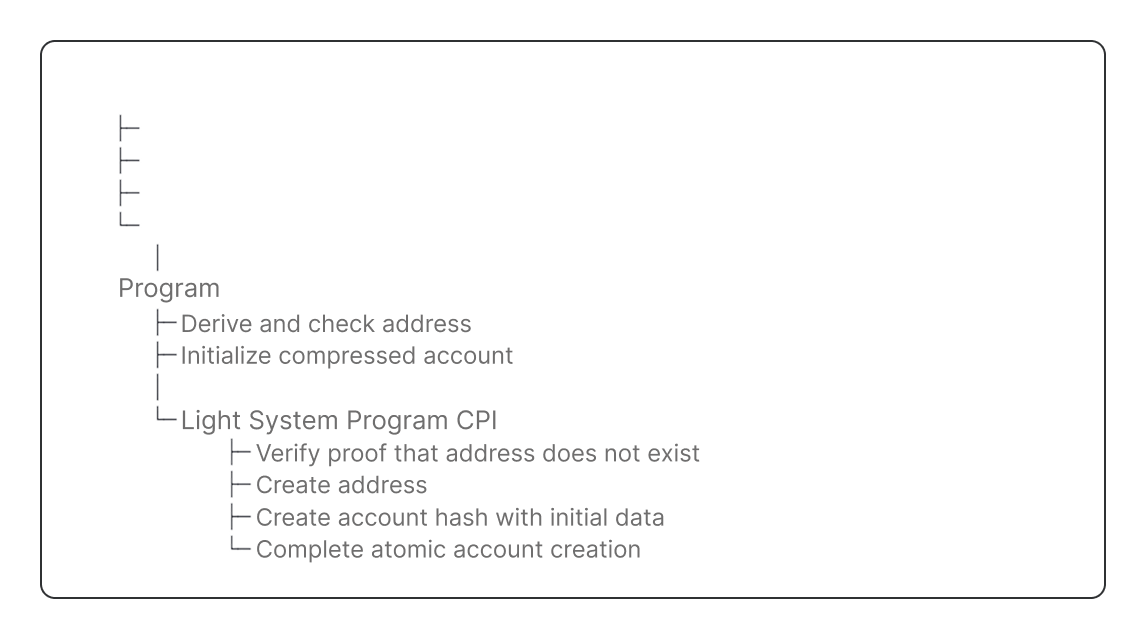
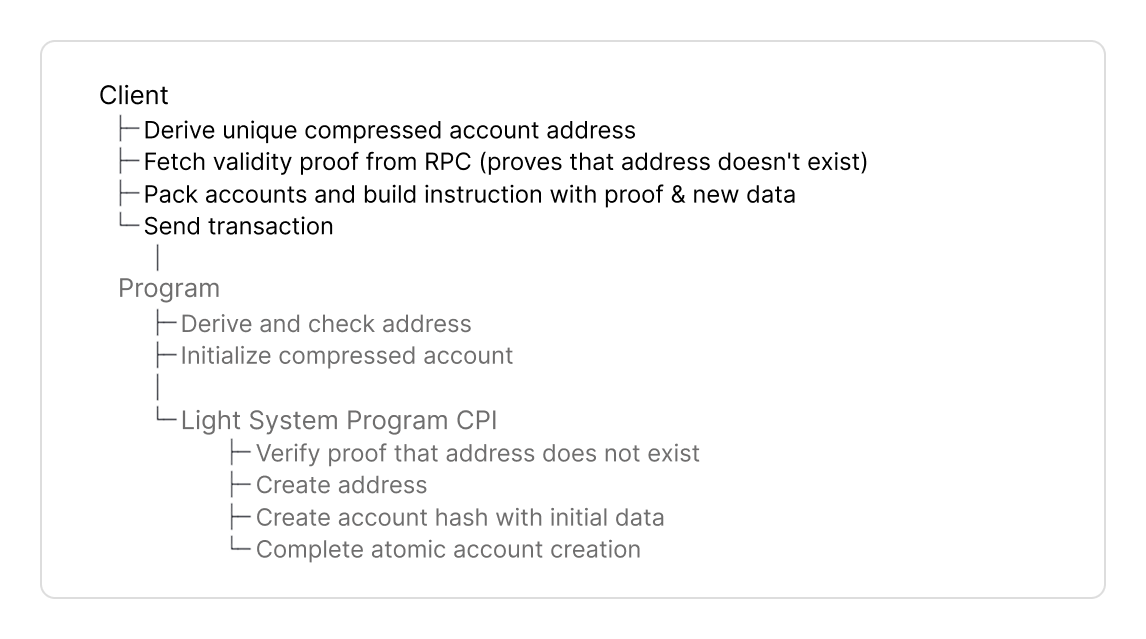
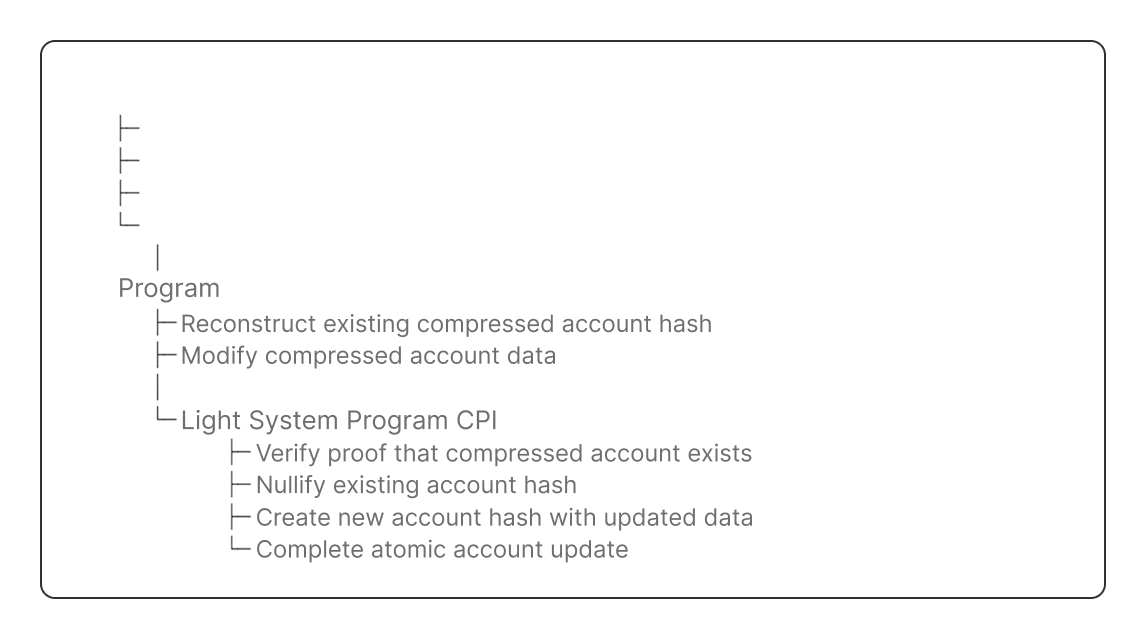
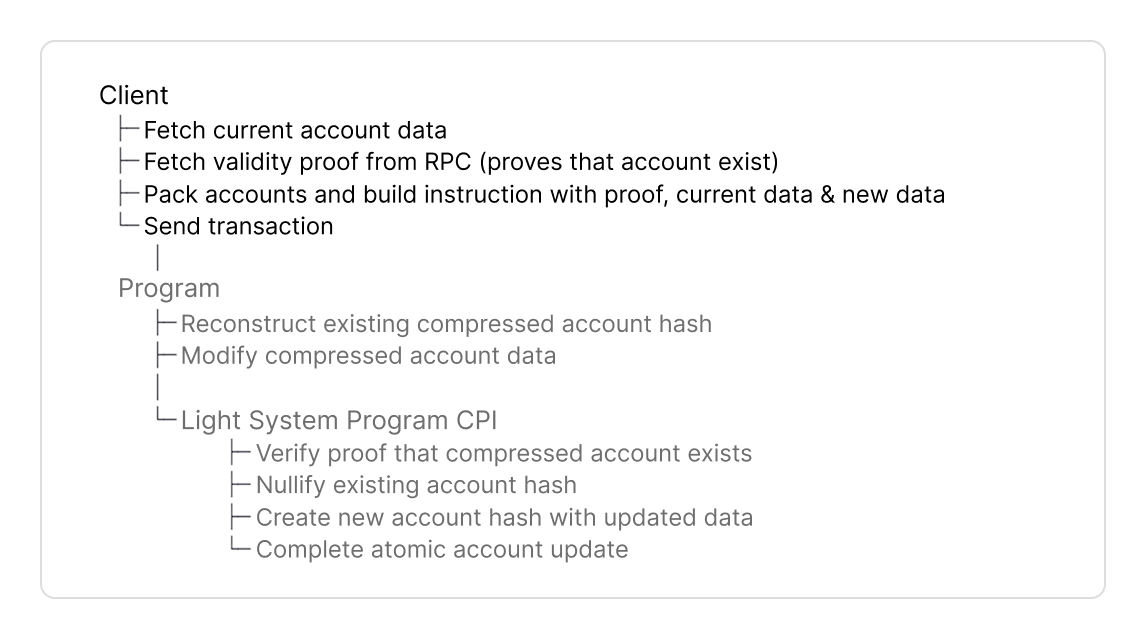
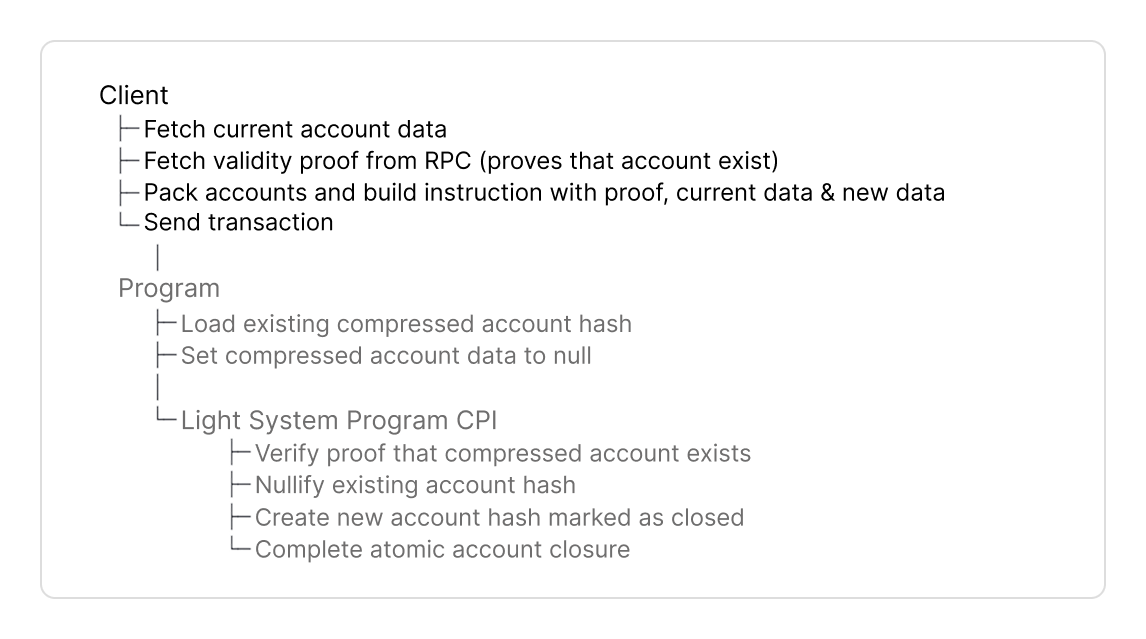
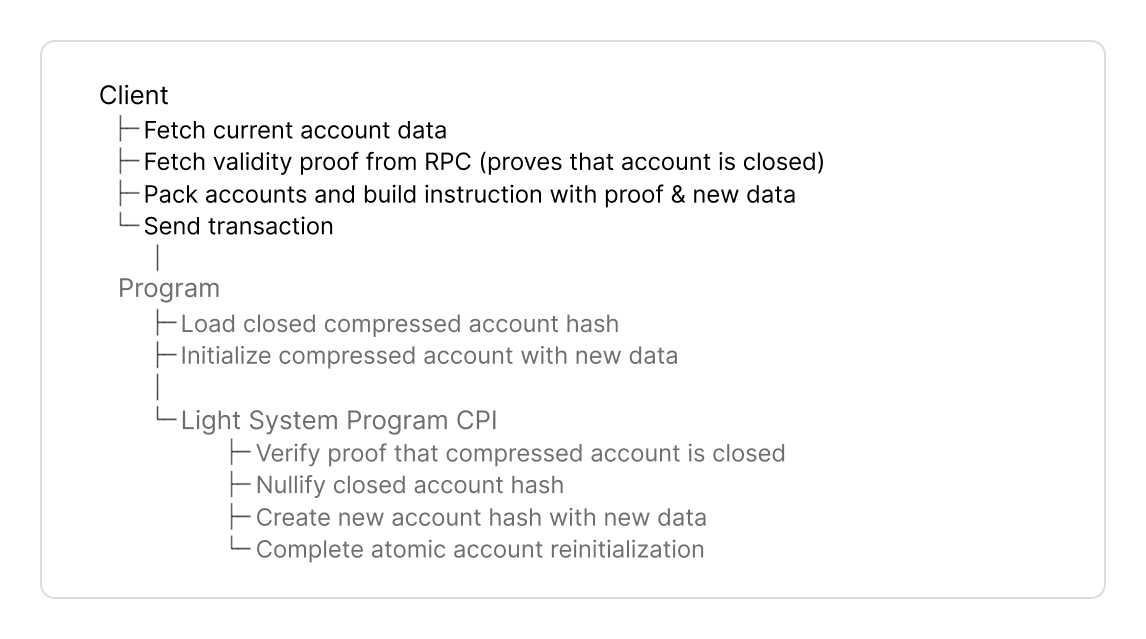
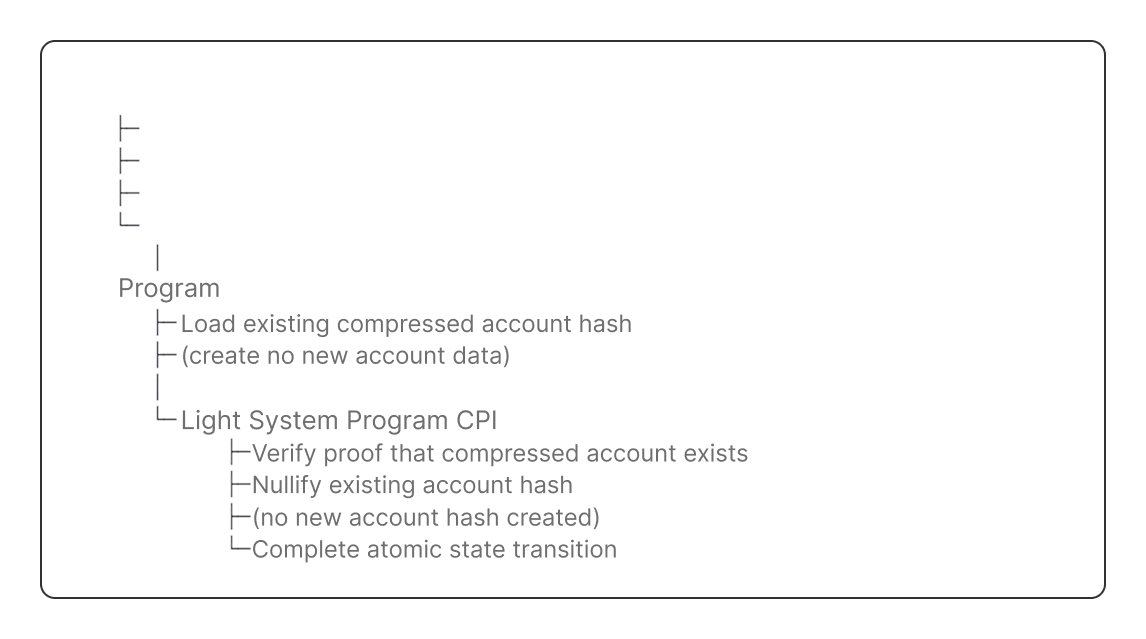
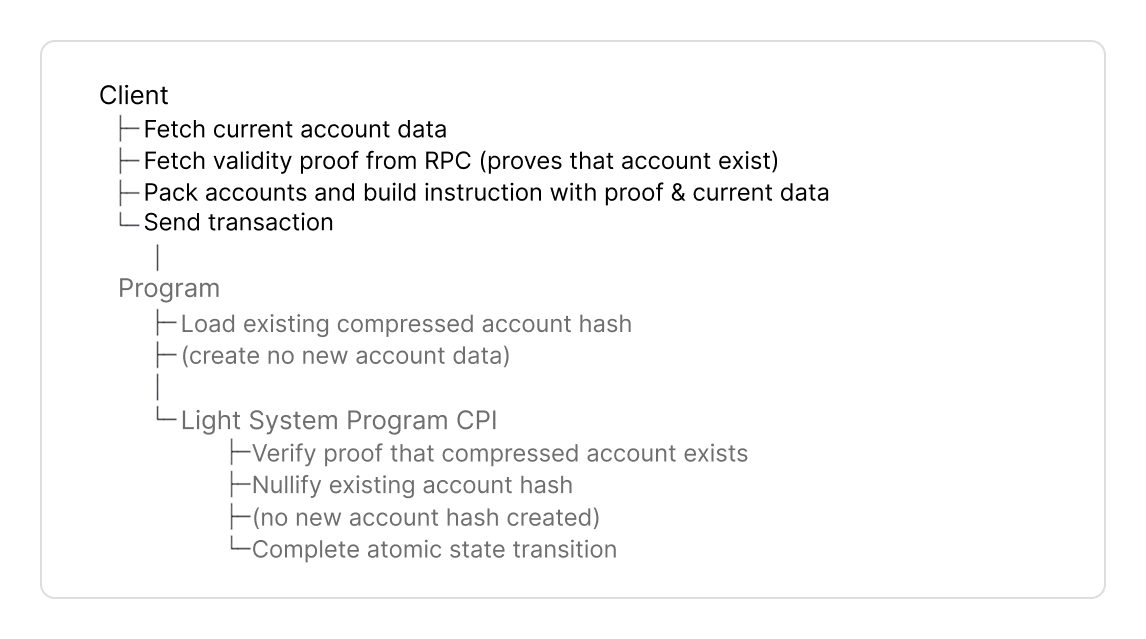
1. **Derive a new address** or **fetch compressed account** for on-chain verification.
2. **Fetch validity proof** from the RPC that verifies a new address does not exist (create) and/or the account hash exists in the state tree (update, close, etc.).
3. **Pack accounts** with the SDKs helper. Instructions require <Tooltip tip="The system program enforces the compressed account layout with ownership and sum checks and verifies the validity of your input state. It is also invoked to create/write to compressed accounts and PDAs.">Light System Program</Tooltip> and <Tooltip tip="Merkle tree accounts are the accounts of state tree and address trees that store compressed account hashes and addresses.">Merkle tree accounts</Tooltip>. `PackedAccounts` converts their pubkeys to `u8` indices pointing to accounts in the instruction.
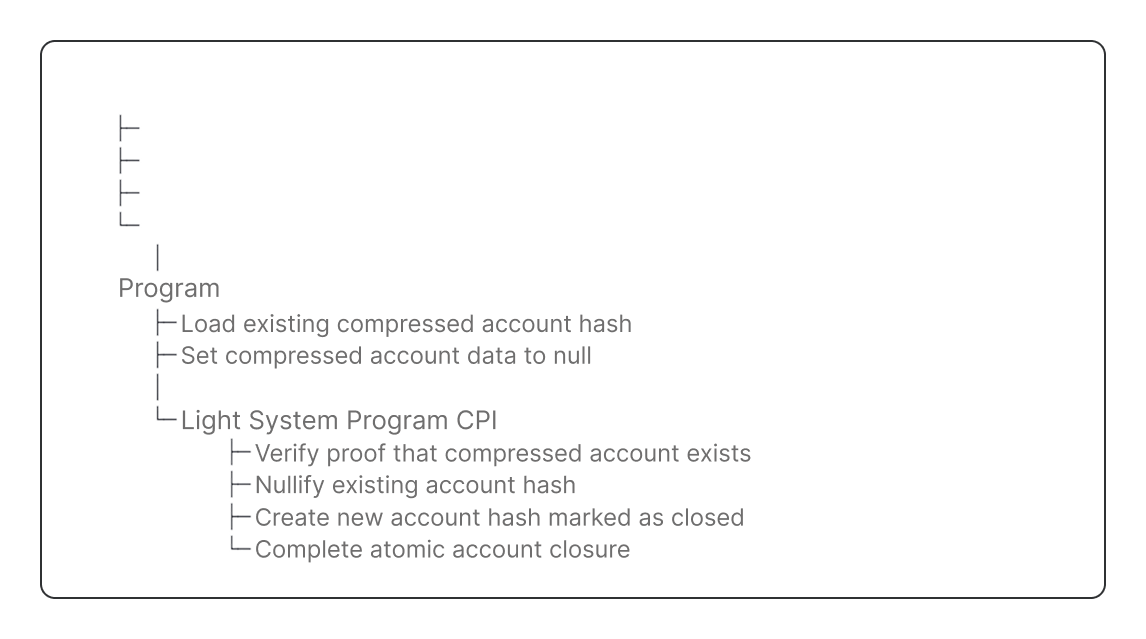
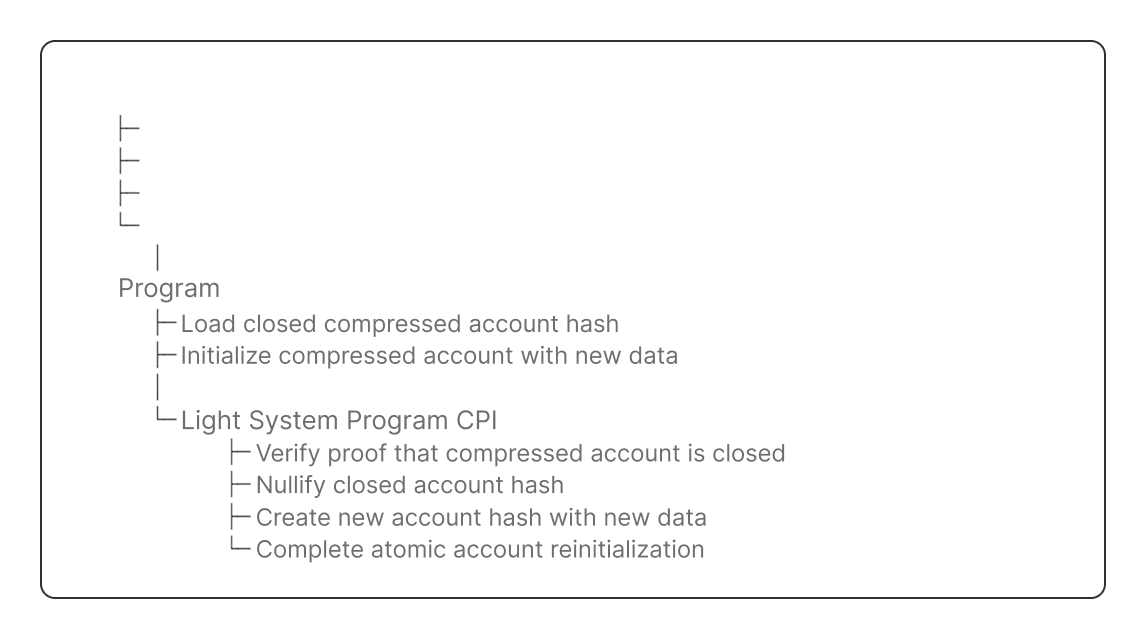
4. **Build the instruction** with the current account data, new data, packed accounts and validity proof.

<Tabs>
  <Tab title="Create">
    <div className="hidden dark:block">
      <Frame>
        <img src="https://mintcdn.com/luminouslabs-cc5545c6-swen-add-code-runner/n0RdKn4MEsiWR00J/images/client-create-dark.png?fit=max&auto=format&n=n0RdKn4MEsiWR00J&q=85&s=eab8ee8c979d381365f3c7bb71a516a2" alt="" width="1146" height="639" data-path="images/client-create-dark.png" />
      </Frame>
    </div>

    <div className="block dark:hidden">
      <Frame>
        <img src="https://mintcdn.com/luminouslabs-cc5545c6-swen-add-code-runner/n0RdKn4MEsiWR00J/images/client-create.png?fit=max&auto=format&n=n0RdKn4MEsiWR00J&q=85&s=17b45b1401db038e753ab882480713bf" alt="" width="1146" height="639" data-path="images/client-create.png" />
      </Frame>
    </div>
  </Tab>

  <Tab title="Update">
    <div className="hidden dark:block">
      <Frame>
        <img src="https://mintcdn.com/luminouslabs-cc5545c6-swen-add-code-runner/n0RdKn4MEsiWR00J/images/client-update-dark.png?fit=max&auto=format&n=n0RdKn4MEsiWR00J&q=85&s=4e7060c754f02743cfd5ac25f7c17195" alt="" width="1146" height="639" data-path="images/client-update-dark.png" />
      </Frame>
    </div>

    <div className="block dark:hidden">
      <Frame>
        <img src="https://mintcdn.com/luminouslabs-cc5545c6-swen-add-code-runner/n0RdKn4MEsiWR00J/images/client-update.png?fit=max&auto=format&n=n0RdKn4MEsiWR00J&q=85&s=e8f35b6b105bd19d1c42c164a631b29e" alt="" width="1146" height="639" data-path="images/client-update.png" />
      </Frame>
    </div>
  </Tab>

  <Tab title="Close">
    <div className="hidden dark:block">
      <Frame>
        <img src="https://mintcdn.com/luminouslabs-cc5545c6-swen-add-code-runner/n0RdKn4MEsiWR00J/images/client-close-dark.png?fit=max&auto=format&n=n0RdKn4MEsiWR00J&q=85&s=eac0041c2d045ccb26a2a858c56f16ae" alt="" width="1146" height="639" data-path="images/client-close-dark.png" />
      </Frame>
    </div>

    <div className="block dark:hidden">
      <Frame>
        <img src="https://mintcdn.com/luminouslabs-cc5545c6-swen-add-code-runner/n0RdKn4MEsiWR00J/images/client-close.png?fit=max&auto=format&n=n0RdKn4MEsiWR00J&q=85&s=c6c220fc68aecc6afde1c9ed1d52cffd" alt="" width="1146" height="639" data-path="images/client-close.png" />
      </Frame>
    </div>
  </Tab>

  <Tab title="Reinitialize">
    <div className="hidden dark:block">
      <Frame>
        <img src="https://mintcdn.com/luminouslabs-cc5545c6-swen-add-code-runner/n0RdKn4MEsiWR00J/images/client-reinit-dark.png?fit=max&auto=format&n=n0RdKn4MEsiWR00J&q=85&s=58beaa5bb05453238902eb9f0dc08bb4" alt="" width="1146" height="639" data-path="images/client-reinit-dark.png" />
      </Frame>
    </div>

    <div className="block dark:hidden">
      <Frame>
        <img src="https://mintcdn.com/luminouslabs-cc5545c6-swen-add-code-runner/n0RdKn4MEsiWR00J/images/client-reinit.png?fit=max&auto=format&n=n0RdKn4MEsiWR00J&q=85&s=54e1426bd1327935527a2d917f96337c" alt="" width="1146" height="639" data-path="images/client-reinit.png" />
      </Frame>
    </div>
  </Tab>

  <Tab title="Burn">
    <div className="hidden dark:block">
      <Frame>
        <img src="https://mintcdn.com/luminouslabs-cc5545c6-swen-add-code-runner/n0RdKn4MEsiWR00J/images/client-burn-dark.png?fit=max&auto=format&n=n0RdKn4MEsiWR00J&q=85&s=472293fdd106f370fcab1d8e5f30b13f" alt="" width="1146" height="639" data-path="images/client-burn-dark.png" />
      </Frame>
    </div>

    <div className="block dark:hidden">
      <Frame>
        <img src="https://mintcdn.com/luminouslabs-cc5545c6-swen-add-code-runner/n0RdKn4MEsiWR00J/images/client-burn.png?fit=max&auto=format&n=n0RdKn4MEsiWR00J&q=85&s=d0136d6d923fe9ca1c02a0d55e790d41" alt="" width="1146" height="639" data-path="images/client-burn.png" />
      </Frame>
    </div>
  </Tab>
</Tabs>

# Get Started

<Steps>
  <Step>
    ## Setup

    <Tabs>
      <Tab title="Typescript">
        <Note>
          Use the [API documentation](https://lightprotocol.github.io/light-protocol/) to look up specific function signatures, parameters, and return types.
        </Note>

        ### 1. Installation

        <Tabs>
          <Tab title="npm">
            ```bash theme={null}
            npm install --save \
                @lightprotocol/stateless.js@0.22.1-alpha.1 \
                @lightprotocol/compressed-token@0.22.1-alpha.1 \
                @solana/web3.js
            ```
          </Tab>

          <Tab title="yarn">
            ```bash theme={null}
            yarn add \
                @lightprotocol/stateless.js@0.22.1-alpha.1 \
                @lightprotocol/compressed-token@0.22.1-alpha.1 \
                @solana/web3.js
            ```
          </Tab>

          <Tab title="pnpm">
            ```bash theme={null}
            pnpm add \
                @lightprotocol/stateless.js@0.22.1-alpha.1 \
                @lightprotocol/compressed-token@0.22.1-alpha.1 \
                @solana/web3.js
            ```
          </Tab>
        </Tabs>

        ### 2. RPC Connection

        `Rpc` is a thin wrapper extending Solana's web3.js `Connection` class with compression-related endpoints.

        <Tabs>
          <Tab title="Mainnet">
            ```typescript theme={null}
            const rpc = createRpc('https://mainnet.helius-rpc.com/?api-key=YOUR_API_KEY');
            ```
          </Tab>

          <Tab title="Devnet">
            ```typescript theme={null}
            const rpc = createRpc('https://devnet.helius-rpc.com/?api-key=YOUR_API_KEY');
            ```
          </Tab>

          <Tab title="Localnet">
            1. Install the CLI

            ```bash theme={null}
            npm i -g @lightprotocol/zk-compression-cli@alpha
            ```

            2. Start a local Solana test validator, photon indexer, and prover server on default ports 8899, 8784, and 3001.

            ```bash theme={null}
            light test-validator
            ```
          </Tab>
        </Tabs>
      </Tab>

      <Tab title="Rust">
        ### 1. Dependencies

        ```toml theme={null}
        [dependencies]
        light-client = "0.16.0"
        light-sdk = "0.16.0"
        ```

        ### 2. RPC Connection

        Connect to an RPC provider that supports ZK Compression, such as Helius and Triton.

        <Tabs>
          <Tab title="Mainnet">
            ```rust theme={null}
            let config = LightClientConfig::new(
                "https://api.mainnet-beta.solana.com".to_string(),
                Some("https://mainnet.helius.xyz".to_string()),
                Some("YOUR_API_KEY".to_string())
            );

            let mut client = LightClient::new(config).await?;

            client.payer = read_keypair_file("~/.config/solana/id.json")?;
            ```
          </Tab>

          <Tab title="Devnet">
            ```rust theme={null}
            let config = LightClientConfig::devnet(
                Some("https://devnet.helius-rpc.com".to_string()),
                Some("YOUR_API_KEY".to_string())
            );

            let mut client = LightClient::new(config).await?;

            client.payer = read_keypair_file("~/.config/solana/id.json")?;
            ```
          </Tab>

          <Tab title="Localnet">
            ```rust theme={null}
            let config = LightClientConfig::local();

            let mut client = LightClient::new(config).await?;

            client.payer = read_keypair_file("~/.config/solana/id.json")?;
            ```

            1. Install the CLI

            ```bash theme={null}
            npm i -g @lightprotocol/zk-compression-cli@alpha
            ```

            2. Start a single-node Solana cluster, an RPC node, and a prover node at ports 8899, 8784, and 3001.

            ```bash theme={null}
            light test-validator
            ```
          </Tab>
        </Tabs>
      </Tab>
    </Tabs>
  </Step>

  <Step>
    ## Address

    Derive a persistent address as a unique identifier for your compressed account, similar to [program-derived addresses (PDAs)](https://solana.com/docs/core/pda).

    You derive addresses in two scenarios:

    * **At account creation** - derive the address to create the account's persistent identifier, then pass it to `getValidityProofV0()` in the address array
    * **Before building instructions** - derive the address to fetch existing accounts using `rpc.getCompressedAccount()`

    <Tabs>
      <Tab title="Typescript">
        <Tabs>
          <Tab title="V1 Address Trees">
            ```typescript theme={null}
            const addressTree = getDefaultAddressTreeInfo();
            const seed = deriveAddressSeed(
              [Buffer.from('my-seed')],
              programId
            );
            const address = deriveAddress(
              seed,
              addressTree.tree
            );
            ```
          </Tab>

          <Tab title="V2 Address Trees">
            ```typescript theme={null}
            const addressTree = await rpc.getAddressTreeInfoV2();
            const seed = deriveAddressSeedV2(
              [Buffer.from('my-seed')]
            );

            const address = deriveAddressV2(
              seed,
              addressTree.tree,
              programId
            );
            ```
          </Tab>
        </Tabs>
      </Tab>

      <Tab title="Rust">
        <Tabs>
          <Tab title="V1 Address Trees">
            ```rust theme={null}
            use light_sdk::address::v1::derive_address;

            let address_tree_info = rpc.get_address_tree_v1();
            let (address, _) = derive_address(
                &[b"my-seed"],
                &address_tree_info.tree,
                &program_id,
            );
            ```
          </Tab>

          <Tab title="V2 Address Trees">
            ```rust theme={null}
            use light_sdk::address::v2::derive_address;

            let address_tree_info = rpc.get_address_tree_v2();
            let (address, _) = derive_address(
                &[b"my-seed"],
                &address_tree_info.tree,
                &program_id,
            );
            ```
          </Tab>
        </Tabs>
      </Tab>
    </Tabs>

    Like PDAs, compressed account addresses don't have a private key; rather, they're derived from the program that owns them.

    * The key difference to PDAs is compressed addresses are stored in an address tree and include this tree in the address derivation.
    * Different trees produce different addresses from identical seeds. You should check the address tree in your program.

    <Tip>
      The protocol maintains Merkle trees. You don't need to initialize custom trees. Find the [pubkeys for Merkle trees here](https://www.zkcompression.com/resources/addresses-and-urls).
    </Tip>
  </Step>

  <Step>
    ## Validity Proof

    Transactions with compressed accounts must include a validity proof:

    * To **create** a compressed account, you prove the **new address doesn't already exist** in the address tree.
    * In **other instructions**, you **prove  the compressed account hash exists** in a state tree.
    * You can **combine multiple addresses and hashes in one proof** to optimize compute cost and instruction data.

    <Info>
      You fetch a validity proof from your RPC provider that supports ZK Compression, such as Helius or Triton.
    </Info>

    <Tabs>
      <Tab title="Typescript">
        <Tabs>
          <Tab title="Create">
            ```typescript theme={null}
            const proof = await rpc.getValidityProofV0(
              [],
              [{
                address: bn(address.toBytes()),
                tree: addressTree.tree,
                queue: addressTree.queue
              }]
            );
            ```

            **1. Pass these parameters**:

            * **Specify the new address**, `tree` and `queue` pubkeys from the address tree `TreeInfo`.
            * When you create an account you don't reference a compressed account hash in the hash array (`[]`). The account doesn't exist in a state Merkle tree yet.

            <Note>
              For account creation, you prove the address does not exist yet in the address tree.
            </Note>

            **2. The RPC returns**:

            * The proof that the new address does not exist in the address tree. It is used in the instruction data.
            * `rootIndices` array with root index.
              * The root index points to the root in the address tree accounts root history array.
              * This root is used by the `LightSystemProgram` to verify the validity proof.
          </Tab>

          <Tab title="Update, Close, Reinit, Burn">
            ```typescript theme={null}
            const proof = await rpc.getValidityProofV0(
              [{
                hash: compressedAccount.hash,
                tree: compressedAccount.treeInfo.tree,
                queue: compressedAccount.treeInfo.queue
              }],
              []
            );
            ```

            **1. Pass these parameters**:

            Specify the **account hash**, `tree` and `queue` pubkeys from the compressed account's `TreeInfo`.

            <Note>
              * You don't specify the address for update, close, reinitialize, and burn instructions.
              * The proof **verifies the account hash exists in the state tree** for these instructions.
              * The validity proof structure is identical. The difference is in your program's instruction handler.
            </Note>

            **2. The RPC returns**:

            * The proof that the account hash exists in the state tree for your instruction data.
            * `rootIndices` and `leafIndices` arrays with proof metadata to pack accounts.
          </Tab>
        </Tabs>
      </Tab>

      <Tab title="Rust">
        <Tabs>
          <Tab title="Create">
            ```rust theme={null}
            let rpc_result = rpc
                .get_validity_proof(
                    vec![],
                    vec![AddressWithTree {
                      address: *address,
                      tree: address_tree_info.tree
                    }],
                    None,
                )
                .await?
                .value;
            ```

            **1. Pass these parameters**:

            * **Specify the new address** and `tree` pubkey from the address tree `TreeInfo`. The `queue` pubkey is only required in TypeScript.
            * When you create an account you don't reference a compressed account hash in the hash array (`vec![]`).

            <Note>
              For account creation, you prove the address does not exist yet in the address tree.
            </Note>

            **2. The RPC returns `ValidityProofWithContext`**:

            * The proof that the new address does not exist in the address tree for your instruction data.
            * `addresses` with the public key and metadata of the address tree to pack accounts.
          </Tab>

          <Tab title="Update, Close, Reinit, Burn">
            ```rust theme={null}
            let rpc_result = rpc
                .get_validity_proof(
                    vec![compressed_account.hash],
                    vec![],
                    None,
                )
                .await?
                .value;
            ```

            **1. Pass these parameters**:

            Specify the **account hash**, `tree` and `queue` pubkeys from the compressed account's `TreeInfo`.

            <Note>
              * You don't specify the address for update, close, reinitialize, and burn instructions.
              * The proof **verifies the account hash exists in the state tree** for these instructions.
              * The validity proof structure is identical. The difference is in your program's instruction handler.
            </Note>

            **2. The RPC returns `ValidityProofWithContext`**:

            * The proof that the **account hash exists in the state tree** for your instruction data
            * `accounts` with the **public key and metadata of the state tree** to pack accounts.
          </Tab>
        </Tabs>
      </Tab>
    </Tabs>

    ### Optimize with Combined Proofs

    Depending on the **Merkle tree version** (V1 or V2), you can prove **in a single proof**:

    * multiple addresses,
    * multiple account hashes, or
    * a combination of addresses and account hashes.

    <Tabs>
      <Tab title="V1">
        |                        |                                                                                                     |
        | ---------------------- | --------------------------------------------------------------------------------------------------- |
        | Account Hash-only      | 1, 2, 3, 4, or 8 hashes                                                                             |
        | Address-only           | 1 and 2 addresses                                                                                   |
        | Mixed (hash + address) | Any combination of <br />**1, 2, 3, 4, or 8** account hashes **and** <br />**1 or 2** new addresses |
      </Tab>

      <Tab title="V2">
        |                        |                                                                                           |
        | ---------------------- | ----------------------------------------------------------------------------------------- |
        | Account Hash-only      | 1 to 8 hashes                                                                             |
        | Address-only           | 1 to 8 addresses                                                                          |
        | Mixed (hash + address) | Any combination of <br />**1 to 4** account hashes **and** <br />**1 or 4** new addresses |
      </Tab>
    </Tabs>

    <Tip>
      **Advantages of combined proofs**:

      * You only add **one 128 byte validity proof** to your instruction data.
      * This can **optimize** your **transaction's size** to stay inside the 1232 byte instruction data limit.
      * **Compute unit consumption is 100k CU** per `ValidityProof` verification by the Light System Program.
    </Tip>

    ### Example Create Address & Update Account in one Proof

    In this example, we generate one proof that proves that an account exists and that a new address does not exist yet.

    <Tabs>
      <Tab title="Typescript">
        ```typescript theme={null}
        const proof = await rpc.getValidityProofV0(
          [{
            hash: compressedAccount.hash,
            tree: compressedAccount.treeInfo.tree,
            queue: compressedAccount.treeInfo.queue
          }],
          [{
            address: bn(address.toBytes()),
            tree: addressTree.tree,
            queue: addressTree.queue
          }]
        );
        ```

        **1. Pass these parameters**:

        * Specify one or more **account hashes**, `tree` and `queue` pubkeys from the compressed account's `TreeInfo`.
        * Specify one or more **new addresses** with their `tree` and `queue` pubkeys from the address tree `TreeInfo`.

        **2. The RPC returns**:

        * A single combined proof that proves both the **account hash exists in the state tree** and the **new address does not exist in the address tree** for your instruction data
        * `rootIndices` and `leafIndices` arrays with proof metadata to pack accounts.
      </Tab>

      <Tab title="Rust">
        ```rust theme={null}
        let rpc_result = rpc
            .get_validity_proof(
                vec![compressed_account.hash],
                vec![AddressWithTree {
                  address: *address,
                  tree: address_tree_info.tree
                }],
                None,
            )
            .await?
            .value;
        ```

        **1. Pass these parameters**:

        * Specify one or more **compressed account hashes**.
        * Specify one or more **derived addresses** with their `tree` pubkeys from the address tree `TreeInfo`. The `queue` pubkey is only required in TypeScript.

        **2. The RPC returns `ValidityProofWithContext`**:

        * A single combined proof that verifies both the **account hash exists in the state tree** and the **new address does not exist in the address tree** for your instruction data
        * New `addresses` with the public key and metadata of the address tree to pack accounts.
        * `accounts` with the public key and metadata of the state tree to pack accounts.
      </Tab>
    </Tabs>

    <Note>
      See the full [create-and-update program example for this proof combination with tests](https://github.com/Lightprotocol/program-examples/tree/main/create-and-update).
    </Note>
  </Step>

  <Step>
    ## Accounts

    To interact with a compressed account you need System accounts such as the <Tooltip tip="The system program enforces the compressed account layout with ownership and sum checks and verifies the validity of your input state. It is also invoked to create/write to compressed accounts and PDAs.">Light System Program</Tooltip>,
    and <Tooltip tip="Merkle tree accounts are the accounts of state tree and address trees that store compressed account hashes and addresses.">Merkle tree accounts</Tooltip>.

    Compressed account metadata (`TreeInfo`) includes Merkle tree pubkeys.
    To optimize instruction data we pack the `pubkeys` of `TreeInfo` into the `u8` indices of `PackedTreeInfo`.

    The `u8` indices point to the Merkle tree account in the instructions accounts.
    You can create the instructions accounts and indices with `PackedAccounts`.

    We recommend to append `PackedAccounts` after your program specific accounts and in anchor in `remaining_accounts`.

    ```
                                      PackedAccounts
                      ┌--------------------------------------------┐
    [custom accounts] [pre accounts][system accounts][tree accounts]
                            ↑              ↑               ↑
                         Signers,      Light System    State trees,
                        fee payer        accounts     address trees,
    ```

    <Accordion title="Custom Accounts">
      Custom accounts are program-specific accounts you pass manually in your instruction, typically through Anchor's account struct.
    </Accordion>

    <Accordion title="Pre Accounts">
      Optional, custom accounts (signers, PDAs for CPIs) and other accounts can be added to pre accounts.
      Pre accounts can simplify building the accounts for pinocchio and native programs.
    </Accordion>

    <Accordion title="Light System Accounts">
      **Light System accounts** are 6 required accounts for proof verification and CPI calls to update state and address trees.

      <table>
        <colgroup>
          <col style={{width: '5%'}} />

          <col style={{width: '30%', textAlign: 'left'}} />

          <col style={{width: '65%'}} />
        </colgroup>

        <thead>
          <tr>
            <th style={{textAlign: 'left'}} />

            <th style={{textAlign: 'left'}} />

            <th style={{textAlign: 'left'}} />
          </tr>
        </thead>

        <tbody>
          <tr>
            <td>1</td>
            <td style={{textAlign: 'left'}}><strong><Tooltip tip="SySTEM1eSU2p4BGQfQpimFEWWSC1XDFeun3Nqzz3rT7" cta="Program ID" href="https://solscan.io/account/SySTEM1eSU2p4BGQfQpimFEWWSC1XDFeun3Nqzz3rT7">Light System Program</Tooltip></strong></td>
            <td>Verifies validity proofs, compressed account ownership checks, and CPIs the Account Compression Program to update tree accounts.</td>
          </tr>

          <tr>
            <td>2</td>
            <td style={{textAlign: 'left'}}><strong>CPI Signer</strong></td>

            <td>
              * PDA to sign CPI calls from your program to the Light System Program.<br />
              * Verified by the Light System Program during CPI.<br />
              * Derived from your program ID.
            </td>
          </tr>

          <tr>
            <td>3</td>
            <td style={{textAlign: 'left'}}><strong>Registered Program PDA</strong></td>
            <td>Provides access control to the Account Compression Program.</td>
          </tr>

          <tr>
            <td>4</td>
            <td style={{textAlign: 'left'}}><strong><Tooltip tip="PDA derived from Light System Program ID with seed b 'cpi_authority'.HZH7qSLcpAeDqCopVU4e5XkhT9j3JFsQiq8CmruY3aru" cta="Program ID" href="https://solscan.io/account/HZH7qSLcpAeDqCopVU4e5XkhT9j3JFsQiq8CmruY3aru">Account Compression Authority</Tooltip></strong></td>
            <td>Signs CPI calls from the Light System Program to the Account Compression Program.</td>
          </tr>

          <tr>
            <td>5</td>
            <td style={{textAlign: 'left'}}><strong><Tooltip tip="compr6CUsB5m2jS4Y3831ztGSTnDpnKJTKS95d64XVq" cta="Program ID" href="https://solscan.io/account/compr6CUsB5m2jS4Y3831ztGSTnDpnKJTKS95d64XVq">Account Compression Program</Tooltip></strong></td>

            <td>
              * Writes to state and address tree accounts.<br />
              * Clients and the Account Compression Program do not interact directly — handled internally.
            </td>
          </tr>

          <tr>
            <td>6</td>
            <td style={{textAlign: 'left'}}><strong><Tooltip tip="11111111111111111111111111111111" cta="Program ID" href="https://solscan.io/account/11111111111111111111111111111111">System Program</Tooltip></strong></td>
            <td>Solana System Program used to transfer lamports.</td>
          </tr>
        </tbody>
      </table>
    </Accordion>

    <Accordion title="Merkle Tree Accounts">
      **Merkle tree accounts** are the accounts of state tree and address trees that store compressed account hashes and addresses.
    </Accordion>

    <Tabs>
      <Tab title="Typescript">
        <Tabs>
          <Tab title="Create">
            ```typescript theme={null}
            // 1. Initialize helper
            const packedAccounts 
              = new PackedAccounts();

            // 2. Add light system accounts
            const systemAccountConfig
              = SystemAccountMetaConfig.new(programId);
            packedAccounts.addSystemAccounts(systemAccountConfig);

            // 3. Get indices for tree accounts
            const addressMerkleTreePubkeyIndex 
              = packedAccounts.insertOrGet(addressTree);
            const addressQueuePubkeyIndex 
              = packedAccounts.insertOrGet(addressQueue);

            const packedAddressTreeInfo = {
              rootIndex: proofRpcResult.rootIndices[0],
              addressMerkleTreePubkeyIndex,
              addressQueuePubkeyIndex,
            };

            // 4. Get index for output state tree
            const stateTreeInfos = await rpc.getStateTreeInfos();
            const outputStateTree = selectStateTreeInfo(stateTreeInfos).tree;
            const outputStateTreeIndex
              = packedAccounts.insertOrGet(outputStateTree);

            // 5. Convert to Account Metas
            const { remainingAccounts }
              = packedAccounts.toAccountMetas();
            ```
          </Tab>

          <Tab title="Update, Close, Reinit Burn">
            ```typescript theme={null}
            // 1. Initialize helper
            const packedAccounts
              = new PackedAccounts();

            // 2. Add system accounts
            const systemAccountConfig
              = SystemAccountMetaConfig.new(programId);
            packedAccounts.addSystemAccounts(systemAccountConfig);

            // 3. Get indices for tree accounts 
            const merkleTreePubkeyIndex
              = packedAccounts.insertOrGet(compressedAccount.treeInfo.tree);
            const queuePubkeyIndex
              = packedAccounts.insertOrGet(compressedAccount.treeInfo.queue);

            const packedInputAccounts = {
              merkleTreePubkeyIndex,
              queuePubkeyIndex,
              leafIndex: proofRpcResult.leafIndices[0],
              rootIndex: proofRpcResult.rootIndices[0],
            };

            const outputStateTreeIndex
              = packedAccounts.insertOrGet(outputStateTree);

            // 4. Convert to Account Metas
            const { remainingAccounts }
              = packedAccounts.toAccountMetas();
            ```
          </Tab>
        </Tabs>
      </Tab>

      <Tab title="Rust">
        <Tabs>
          <Tab title="Create">
            ```rust theme={null}
            // 1. Initialize helper
            let mut remaining_accounts = PackedAccounts::default();

            // 2. Add system accounts
            let config
              = SystemAccountMetaConfig::new(program_id);
              remaining_accounts.add_system_accounts(config)?;

            // 3. Get indices for tree accounts
            let packed_accounts
              = rpc_result.pack_tree_infos(&mut remaining_accounts);

            // 4. Get index for output state tree
            let output_state_tree_info = rpc.get_random_state_tree_info()?;
            let output_state_tree_index
              = output_state_tree_info.pack_output_tree_index(&mut remaining_accounts)?;

            // 5. Convert to Account Metas
            let (remaining_accounts_metas, _, _)
              = remaining_accounts.to_account_metas();
            ```
          </Tab>

          <Tab title="Update, Close, Reinit, Burn">
            ```rust theme={null}
            // 1. Initialize helper
            let mut remaining_accounts = PackedAccounts::default();

            // 2. Add system accounts
            let config
              = SystemAccountMetaConfig::new(program_id);
              remaining_accounts.add_system_accounts(config)?;

            // 3. Get indices for tree accounts
            let packed_tree_accounts = rpc_result
                .pack_tree_infos(&mut remaining_accounts)
                .state_trees // includes output_state_tree_index
                .unwrap();

            // 4. Convert to Account Metas
            let (remaining_accounts_metas, _, _)
              = remaining_accounts.to_account_metas();
            ```
          </Tab>
        </Tabs>
      </Tab>
    </Tabs>

    Depending on your instruction you must include different tree and queue accounts.

    <Tabs>
      <Tab title="V1 Trees">
        <table>
          <thead>
            <tr>
              <th width="150">Instruction</th>
              <th width="80" className="text-center">Address Tree</th>
              <th width="80" className="text-center">State Tree</th>
              <th width="100" className="text-center">Nullifier Queue</th>
              <th width="120" className="text-center">Output State Tree</th>
            </tr>
          </thead>

          <tbody>
            <tr>
              <td>Create</td>
              <td className="text-center">✓</td>
              <td className="text-center">-</td>
              <td className="text-center">-</td>
              <td className="text-center">✓</td>
            </tr>

            <tr>
              <td>Update / Close / Reinit</td>
              <td className="text-center">-</td>
              <td className="text-center">✓</td>
              <td className="text-center">✓</td>
              <td className="text-center">✓</td>
            </tr>

            <tr>
              <td>Burn</td>
              <td className="text-center">-</td>
              <td className="text-center">✓</td>
              <td className="text-center">✓</td>
              <td className="text-center">-</td>
            </tr>
          </tbody>
        </table>

        * The **Address tree** is used to derive and store a new address (create-only)
        * The **State tree** is used to reference the existing compressed account hash. Therefore not used by create.
        * The **Nullifier queue** is used to nullify the existing compressed account hash to prevent double spending. Therefore not used by create.
        * The **Output State tree** is used to store the new or updated compressed account hash.
          * **Create only** - Choose any available state tree, or use a pre-selected tree to store the new compressed account.
          * **Update/Close/Reinit** - Use the state tree of the existing compressed account as output state tree.
          * **Mixed instructions (create + update in same tx)** - Use the state tree from the existing account as output state tree.
          * **Burn** - Burn does not produce output state and does not need an output state tree.
      </Tab>

      <Tab title="V2 Trees">
        <table>
          <thead>
            <tr>
              <th width="150">Instruction</th>
              <th width="80" className="text-center">Address Tree</th>
              <th width="200" className="text-center">State Tree (includes nullifier queue)</th>
              <th width="90" className="text-center">Output Queue</th>
            </tr>
          </thead>

          <tbody>
            <tr>
              <td>Create</td>
              <td className="text-center">✓</td>
              <td className="text-center">-</td>
              <td className="text-center">✓</td>
            </tr>

            <tr>
              <td>Update / Close / Reinit</td>
              <td className="text-center">-</td>
              <td className="text-center">✓</td>
              <td className="text-center">✓</td>
            </tr>

            <tr>
              <td>Burn</td>
              <td className="text-center">-</td>
              <td className="text-center">✓</td>
              <td className="text-center">-</td>
            </tr>
          </tbody>
        </table>

        * **Address tree**: only used to derive and store a new address.
        * **State tree**: used to reference the existing compressed account hash. Therefore not used by create. V2 combines the state tree and nullifier queue into a single account.
        * **Output Queue**: used to store compressed account hashes. A forester node updates the state tree asynchronously.
          * **Create only** - Choose any available queue, or use a pre-selected queue to store the new compressed account.
          * **Update/Close/Reinit** - Use the queue of the existing compressed account as output queue.
          * **Mixed instructions (create + update in same tx)** - Use the queue from the existing account as output queue.
          * **Burn** - Do not include an output queue.
      </Tab>
    </Tabs>

    <Tip>
      V2 is on Devnet and reduces compute unit consumption by up to 70%.
    </Tip>
  </Step>

  <Step>
    ## Instruction Data

    Build your instruction data with the validity proof, tree account indices, and account data.

    <Tabs>
      <Tab title="Typescript">
        <Tabs>
          <Tab title="Create">
            ```typescript theme={null}
            const proof = {
              0: proofRpcResult.compressedProof,
            };

            const instructionData = {
              proof,
              addressTreeInfo: packedAddressTreeInfo,
              outputStateTreeIndex: outputStateTreeIndex,
              message,
            };
            ```

            1. Include `proof` to **prove the address does not exist** in the address tree
            2. Specify **Merkle trees to store address and account hash** to where you packed accounts.
            3. Pass **initial account data**
          </Tab>

          <Tab title="Update">
            ```typescript theme={null}
            const proof = {
              0: proofRpcResult.compressedProof,
            };

            const instructionData = {
              proof,
              accountMeta: {
                treeInfo: packedStateTreeInfo,
                address: compressedAccount.address,
                outputStateTreeIndex: outputStateTreeIndex
              },
              currentMessage: currentAccount.message,
              newMessage,
            };
            ```

            1. Include `proof` to to prove the **account hash exists** in the state tree
            2. Specify the existing accounts address, its `packedStateTreeInfo` and the output state tree to store the updated compressed account hash.
            3. Pass **current account data** and **new data**

            <Tip>
              Use the state tree of the existing compressed account as output state tree.
            </Tip>
          </Tab>

          <Tab title="Close">
            ```typescript theme={null}
            const proof = {
              0: proofRpcResult.compressedProof,
            };

            const instructionData = {
              proof,
              accountMeta: {
                treeInfo: packedStateTreeInfo,
                address: compressedAccount.address,
                outputStateTreeIndex: outputStateTreeIndex
              },
              currentMessage: currentAccount.message,
            };
            ```

            1. Include `proof` to prove the **account hash exists** in the state tree
            2. Specify the existing accounts address, its `packedStateTreeInfo` and the output state tree to store the **hash with zero values** for the closed account.
            3. Pass **current account data**

            <Tip>
              Use the state tree of the existing compressed account as output state tree.
            </Tip>
          </Tab>

          <Tab title="Reinit">
            ```typescript theme={null}
            const proof = {
              0: proofRpcResult.compressedProof,
            };

            const instructionData = {
              proof,
              accountMeta: {
                treeInfo: packedStateTreeInfo,
                address: compressedAccount.address,
                outputStateTreeIndex: outputStateTreeIndex
              },
            };
            ```

            1. Include `proof` to prove the **account hash exists** in the state tree
            2. Specify the existing accounts address, its `packedStateTreeInfo` and the output state tree that will store the reinitialized account hash
            3. Reinitialize creates an account with **default-initialized values**

            * These values are `Pubkey` as all zeros, numbers as `0`, strings as empty.
            * To set custom values, update the account in the same or a separate transaction.

            <Tip>
              Use the state tree of the existing compressed account as output state tree.
            </Tip>
          </Tab>

          <Tab title="Burn">
            ```typescript theme={null}
            const proof = {
              0: proofRpcResult.compressedProof,
            };

            const instructionData = {
              proof,
              accountMeta: {
                treeInfo: packedStateTreeInfo,
                address: compressedAccount.address
              },
              currentMessage: currentAccount.message,
            };
            ```

            1. Include `proof` to prove the **account hash exists** in the state tree
            2. Specify the existing accounts address and its `packedStateTreeInfo`. You don't need to specify the output state tree, since burn permanently removes the account.
            3. Pass **current account data**
          </Tab>
        </Tabs>
      </Tab>

      <Tab title="Rust">
        <Tabs>
          <Tab title="Create">
            ```rust theme={null}
            let instruction_data = create::instruction::CreateAccount {
                proof: rpc_result.proof,
                address_tree_info: packed_accounts.address_trees[0],
                output_state_tree_index: output_state_tree_index,
                message,
            }
            .data();
            ```

            1. Include `proof` to prove the **address does not exist** in the address tree
            2. Specify **address tree and output state tree** to where you packed accounts
            3. Pass **initial account data**
          </Tab>

          <Tab title="Update">
            ```rust theme={null}
            let instruction_data = update::instruction::UpdateAccount {
                proof: rpc_result.proof,
                current_account,
                account_meta: CompressedAccountMeta {
                    tree_info: packed_tree_accounts.packed_tree_infos[0],
                    address: compressed_account.address.unwrap(),
                    output_state_tree_index: packed_tree_accounts.output_tree_index,
                },
                new_message,
            }
            .data();
            ```

            <Tip>
              Use the state tree of the existing compressed account as output state tree.
            </Tip>

            1. Include `proof` to prove the **account hash exists** in the state tree
            2. Specify the existing accounts address, its `packed_tree_infos` and the output state tree to store the updated compressed account hash
            3. Pass **current account data** and **new data**
          </Tab>

          <Tab title="Close">
            ```rust theme={null}
            let instruction_data = close::instruction::CloseAccount {
                proof: rpc_result.proof,
                account_meta: CompressedAccountMeta {
                    tree_info: packed_tree_accounts.packed_tree_infos[0],
                    address: compressed_account.address.unwrap(),
                    output_state_tree_index: packed_tree_accounts.output_tree_index,
                },
                current_message,
            }
            .data();
            ```

            <Tip>
              Use the state tree of the existing compressed account as output state tree.
            </Tip>

            1. Include `proof` to prove the **account hash exists** in the state tree
            2. Specify the existing accounts address, its `packed_tree_infos` and the output state tree to store the **hash with zero values** for the closed account
            3. Pass **current account data**
          </Tab>

          <Tab title="Reinit">
            ```rust theme={null}
            let instruction_data = reinit::instruction::ReinitAccount {
                proof: rpc_result.proof,
                account_meta: CompressedAccountMeta {
                    tree_info: packed_tree_accounts.packed_tree_infos[0],
                    address: compressed_account.address.unwrap(),
                    output_state_tree_index: packed_tree_accounts.output_tree_index,
                },
            }
            .data();
            ```

            <Tip>
              Use the state tree of the existing compressed account as output state tree.
            </Tip>

            1. Include `proof` to prove the **account hash exists** in the state tree
            2. Specify the existing accounts address, its `packed_tree_infos` and the output state tree that will store the reinitialized account hash
            3. Reinitialize creates an account with **default-initialized values**

            * These values are `Pubkey` as all zeros, numbers as `0`, strings as empty.
            * To set custom values, update the account in the same or a separate transaction.
          </Tab>

          <Tab title="Burn">
            ```rust theme={null}
            let instruction_data = burn::instruction::BurnAccount {
                proof: rpc_result.proof,
                account_meta: CompressedAccountMetaBurn {
                    tree_info: packed_tree_accounts.packed_tree_infos[0],
                    address: compressed_account.address.unwrap(),
                },
                current_message,
            }
            .data();
            ```

            1. Include `proof` to prove the **account hash exists** in the state tree
            2. Specify the existing accounts address and its `packed_tree_infos`. You don't need to specify the output state tree, since burn permanently removes the account
            3. Pass **current account data**
          </Tab>
        </Tabs>
      </Tab>
    </Tabs>

    <Warning>
      * When creating or updating multiple accounts in a single transaction, use one output state tree.
      * Minimize the number of different trees per transaction to keep instruction data light.
    </Warning>
  </Step>

  <Step>
    ## Instruction

    Build the instruction with your `program_id`, `accounts`, and `data`.

    * Accounts combine your program-specific accounts and `PackedAccounts`.
    * Data includes your compressed accounts, validity proof and other instruction data.

    <Tabs>
      <Tab title="Typescript">
        ```typescript theme={null}
        //             Accounts
        // ┌-------------------------------┐
        // .accounts()    .remainingAccounts()
        // [custom]         [PackedAccounts]

        const instruction = await program.methods
          .yourInstruction(instructionData)
          .accounts({
            signer: signer.publicKey,
          })
          .remainingAccounts(remainingAccounts)
          .instruction();
        ```
      </Tab>

      <Tab title="Rust">
        ```rust theme={null}
        //          Accounts
        // ┌---------------------------------┐
        // [custom accounts]  [PackedAccounts]
        let accounts = [vec![AccountMeta::new(payer.pubkey(), true)], remaining_accounts].concat();

        let instruction = Instruction {
            program_id: program_id,
            accounts,
            data: instruction_data,
        };
        ```
      </Tab>
    </Tabs>
  </Step>

  <Step>
    ## Send Transaction
  </Step>
</Steps>

# Full Code Examples

<Tabs>
  <Tab title="Typescript">
    ```typescript expandable wrap theme={null}
    // create.ts
    import * as anchor from "@coral-xyz/anchor";
    import { Program, web3 } from "@coral-xyz/anchor";
    import { Create } from "../target/types/create";
    import idl from "../target/idl/create.json";
    import {
      bn,
      CompressedAccountWithMerkleContext,
      confirmTx,
      createRpc,
      defaultStaticAccountsStruct,
      defaultTestStateTreeAccounts,
      deriveAddress,
      deriveAddressSeed,
      LightSystemProgram,
      PackedAccounts,
      Rpc,
      sleep,
      SystemAccountMetaConfig,
    } from "@lightprotocol/stateless.js";
    import * as assert from "assert";

    const path = require("path");
    const os = require("os");
    require("dotenv").config();

    const anchorWalletPath = path.join(os.homedir(), ".config/solana/id.json");
    process.env.ANCHOR_WALLET = anchorWalletPath;

    describe("test-anchor", () => {
      const program = anchor.workspace.Create as Program<Create>;
      const coder = new anchor.BorshCoder(idl as anchor.Idl);

      it("create compressed account", async () => {
        let signer = new web3.Keypair();
        let rpc = createRpc(
          "http://127.0.0.1:8899",
          "http://127.0.0.1:8784",
          "http://127.0.0.1:3001",
          {
            commitment: "confirmed",
          },
        );
        let lamports = web3.LAMPORTS_PER_SOL;
        await rpc.requestAirdrop(signer.publicKey, lamports);
        await sleep(2000);

        const outputStateTree = defaultTestStateTreeAccounts().merkleTree;
        const addressTree = defaultTestStateTreeAccounts().addressTree;
        const addressQueue = defaultTestStateTreeAccounts().addressQueue;

        const messageSeed = new TextEncoder().encode("message");
        const seed = deriveAddressSeed(
          [messageSeed, signer.publicKey.toBytes()],
          new web3.PublicKey(program.idl.address),
        );
        const address = deriveAddress(seed, addressTree);

        // Create compressed account with message
        const txId = await createCompressedAccount(
          rpc,
          addressTree,
          addressQueue,
          address,
          program,
          outputStateTree,
          signer,
          "Hello, compressed world!",
        );
        console.log("Transaction ID:", txId);

        // Wait for indexer to process the transaction
        const slot = await rpc.getSlot();
        await rpc.confirmTransactionIndexed(slot);

        let compressedAccount = await rpc.getCompressedAccount(bn(address.toBytes()));
        let myAccount = coder.types.decode(
          "MyCompressedAccount",
          compressedAccount.data.data,
        );

        console.log("Decoded data owner:", myAccount.owner.toBase58());
        console.log("Decoded data message:", myAccount.message);

        // Verify account data
        assert.ok(
          myAccount.owner.equals(signer.publicKey),
          "Owner should match signer public key"
        );
        assert.strictEqual(
          myAccount.message,
          "Hello, compressed world!",
          "Message should match the created message"
        );
      });
    });

    async function createCompressedAccount(
      rpc: Rpc,
      addressTree: anchor.web3.PublicKey,
      addressQueue: anchor.web3.PublicKey,
      address: anchor.web3.PublicKey,
      program: anchor.Program<Create>,
      outputStateTree: anchor.web3.PublicKey,
      signer: anchor.web3.Keypair,
      message: string,
    ) {
      const proofRpcResult = await rpc.getValidityProofV0(
        [],
        [
          {
            tree: addressTree,
            queue: addressQueue,
            address: bn(address.toBytes()),
          },
        ],
      );
      const systemAccountConfig = new SystemAccountMetaConfig(program.programId);
      let remainingAccounts = new PackedAccounts();
      remainingAccounts.addSystemAccounts(systemAccountConfig);

      const addressMerkleTreePubkeyIndex =
        remainingAccounts.insertOrGet(addressTree);
      const addressQueuePubkeyIndex = remainingAccounts.insertOrGet(addressQueue);
      const packedAddressTreeInfo = {
        rootIndex: proofRpcResult.rootIndices[0],
        addressMerkleTreePubkeyIndex,
        addressQueuePubkeyIndex,
      };
      const outputStateTreeIndex =
        remainingAccounts.insertOrGet(outputStateTree);
      let proof = {
        0: proofRpcResult.compressedProof,
      };
      const computeBudgetIx = web3.ComputeBudgetProgram.setComputeUnitLimit({
        units: 1000000,
      });
      let tx = await program.methods
        .createAccount(proof, packedAddressTreeInfo, outputStateTreeIndex, message)
        .accounts({
          signer: signer.publicKey,
        })
        .preInstructions([computeBudgetIx])
        .remainingAccounts(remainingAccounts.toAccountMetas().remainingAccounts)
        .signers([signer])
        .transaction();
      tx.recentBlockhash = (await rpc.getRecentBlockhash()).blockhash;
      tx.sign(signer);

      const sig = await rpc.sendTransaction(tx, [signer]);
      await confirmTx(rpc, sig);
      return sig;
    }
    ```
  </Tab>

  <Tab title="Rust">
    ```rust expandable wrap theme={null}
    // test.rs
    #![cfg(feature = "test-sbf")]

    use anchor_lang::AnchorDeserialize;
    use light_program_test::{
        program_test::LightProgramTest, AddressWithTree, Indexer, ProgramTestConfig, Rpc, RpcError,
    };
    use light_sdk::{
        address::v1::derive_address,
        instruction::{PackedAccounts, SystemAccountMetaConfig},
    };
    use create::MyCompressedAccount;
    use solana_sdk::{
        instruction::{AccountMeta, Instruction},
        signature::{Keypair, Signature, Signer},
    };

    #[tokio::test]
    async fn test_create() {
        let config = ProgramTestConfig::new(true, Some(vec![("create", create::ID)]));
        let mut rpc = LightProgramTest::new(config).await.unwrap();
        let payer = rpc.get_payer().insecure_clone();

        let address_tree_info = rpc.get_address_tree_v1();

        let (address, _) = derive_address(
            &[b"message", payer.pubkey().as_ref()],
            &address_tree_info.tree,
            &create::ID,
        );

        create_compressed_account(&mut rpc, &payer, &address, "Hello, compressed world!".to_string())
            .await
            .unwrap();

        let compressed_account = rpc
            .get_compressed_account(address, None)
            .await
            .unwrap()
            .value
            .unwrap();
        let data = &compressed_account.data.as_ref().unwrap().data;
        let account = MyCompressedAccount::deserialize(&mut &data[..]).unwrap();
        assert_eq!(account.owner, payer.pubkey());
        assert_eq!(account.message, "Hello, compressed world!");
    }

    async fn create_compressed_account(
        rpc: &mut LightProgramTest,
        payer: &Keypair,
        address: &[u8; 32],
        message: String,
    ) -> Result<Signature, RpcError> {
        let config = SystemAccountMetaConfig::new(create::ID);
        let mut remaining_accounts = PackedAccounts::default();
        remaining_accounts.add_system_accounts(config)?;

        let address_tree_info = rpc.get_address_tree_v1();

        let rpc_result = rpc
            .get_validity_proof(
                vec![],
                vec![AddressWithTree {
                    address: *address,
                    tree: address_tree_info.tree,
                }],
                None,
            )
            .await?
            .value;
        let packed_accounts = rpc_result.pack_tree_infos(&mut remaining_accounts);

        let output_state_tree_index = rpc
            .get_random_state_tree_info()?
            .pack_output_tree_index(&mut remaining_accounts)?;

        let (remaining_accounts, _, _) = remaining_accounts.to_account_metas();

        let instruction = Instruction {
            program_id: create::ID,
            accounts: [
                vec![AccountMeta::new(payer.pubkey(), true)],
                remaining_accounts,
            ]
            .concat(),
            data: {
                use anchor_lang::InstructionData;
                create::instruction::CreateAccount {
                    proof: rpc_result.proof,
                    address_tree_info: packed_accounts.address_trees[0],
                    output_state_tree_index: output_state_tree_index,
                    message,
                }
                .data()
            },
        };

        rpc.create_and_send_transaction(&[instruction], &payer.pubkey(), &[payer])
            .await
    }
    ```
  </Tab>
</Tabs>

Find all [full code examples with Rust and Typescript tests here](https://github.com/Lightprotocol/program-examples/tree/add-basic-operations-examples/basic-operations/anchor) for the following instructions:

* **create** - Initialize a new compressed account
* **update** - Modify data of an existing compressed account
* **close** - Close a compressed account (it can be initialized again).
* **reinit** - Reinitialize a closed account
* **burn** - Permanently delete a compressed account (it cannot be initialized again).

<Warning>
  For help with debugging, see the [Error Cheatsheet](https://www.zkcompression.com/resources/error-cheatsheet) and [AskDevin](https://deepwiki.com/Lightprotocol/light-protocol/3.1-javascripttypescript-sdks).
</Warning>

# Next Steps

<Card title="Get an overview to Compressed PDA guides and build a program." icon="chevron-right" color="#0066ff" href="/compressed-pdas/guides" horizontal />
